Answer

Tracking clicks natively in LinkedIn

  • July 30, 2025
  • 3 replies
  • 81 views

I am running a test to see if posts perform better when the link is in the comments vs. in the caption. I’m wondering if anyone can help answer a question I have.

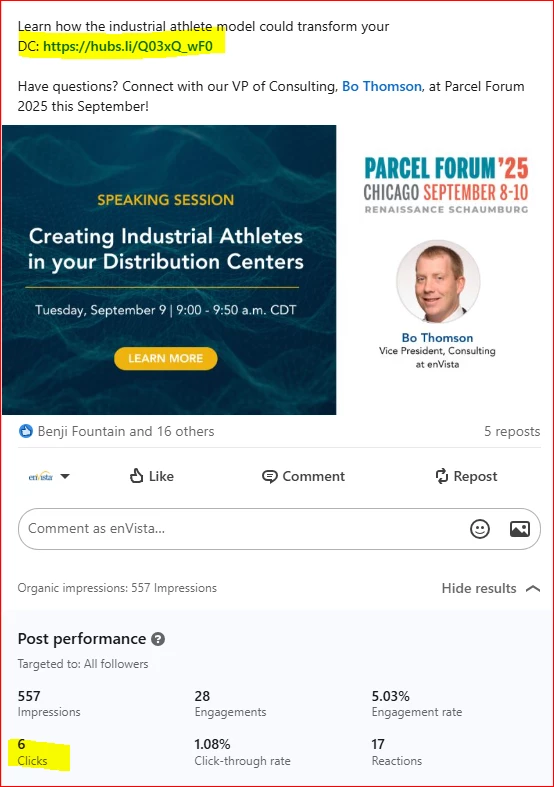
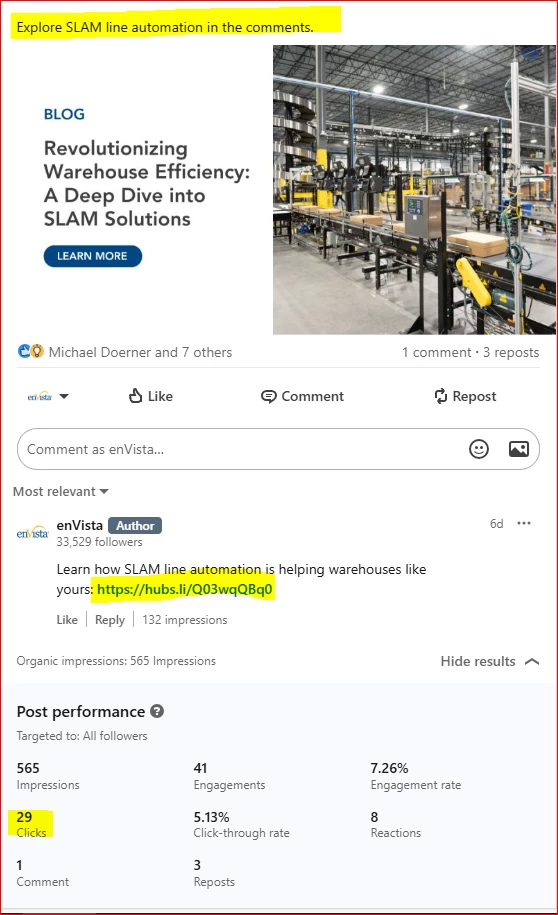
From what I’ve found online, LinkedIn doesn’t track clicks on links that are in the comments, only links that are in the captions. However, I’ve noticed that on posts where the link is in the comments, LinkedIn is showing clicks in its native tracking section, and the number is inordinately high compared to posts where the link is in the caption. 

Can anyone explain this? Is it tracking clicks on the image that was included in the post? And if that’s the case, when the link is in the caption, how do I know it’s tracking clicks on the link and not clicks on the image? (my images are not clickable)

Examples:
 

Best answer by kate.meyers emery

Clicks on LinkedIn includes any click, such as clicking a carousel to spin it, clicking an image to view it closer, or clicking a link. 

A better way to track the difference would be to create custom links and use them in different places. You could either customize the UTM in Google or get a Bitly link. Make one for the body and one for the comments and see how they perform differently. 

3 replies

kate.meyers emery
Forum|alt.badge.img+7

Clicks on LinkedIn includes any click, such as clicking a carousel to spin it, clicking an image to view it closer, or clicking a link. 

A better way to track the difference would be to create custom links and use them in different places. You could either customize the UTM in Google or get a Bitly link. Make one for the body and one for the comments and see how they perform differently. 


  • Author
  • Level 1
  • August 11, 2025

Thank you so much! 


kate.meyers emery
Forum|alt.badge.img+7

Happy to help!