
Solved

Q1 Engagements seem very high - boosted post counted?

  • May 12, 2026
  • 3 replies
  • 30 views

sdtitmas
Forum|alt.badge.img+4

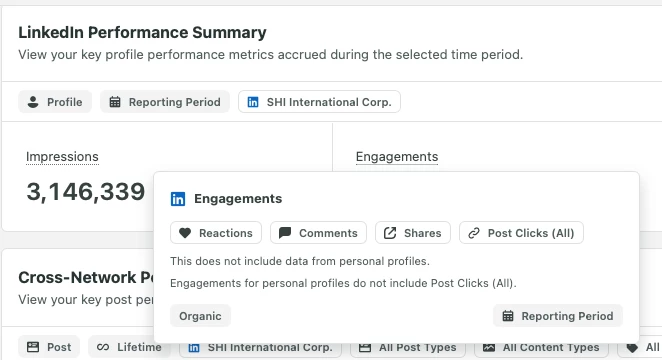
Hey all! In the Reposting > My reports tab I have “Engagements” as one of the categories for LinkedIn and it appears that it is organic only. However, it seems this number is quite high from what I’d expect. We did start more boosting of organic content, and I’m wondering if it’s possible that since they are organic posts, then boosted, could Sprout be getting “tricked” into thinking they are organic engagements?

Thanks for any insights!
 

Best answer by Max Pete

@sdtitmas That’s a great catch! Definitely not being tricked, you are seeing the combined power of your organic content and your paid spend working together.

When you boost an existing organic post on LinkedIn, the platform keeps the same Post ID for both the organic and paid versions. Because of this, LinkedIn’s API often reports a total impact figure back to Sprout, which includes both your organic and boosted engagements in that specific report view.

Essentially, you are seeing the total pulse of that post. If you are looking to dive deeper and see a clean split between the two, and using our Premium Analytics features (specifically the Paid vs. Organic widgets) these are designed to help you peel back those layers and see exactly how your boosting strategy is driving that extra growth.

3 replies

Max Pete
Community Manager
Forum|alt.badge.img+2
  • Community Manager
  • Answer
  • May 12, 2026

@sdtitmas That’s a great catch! Definitely not being tricked, you are seeing the combined power of your organic content and your paid spend working together.

When you boost an existing organic post on LinkedIn, the platform keeps the same Post ID for both the organic and paid versions. Because of this, LinkedIn’s API often reports a total impact figure back to Sprout, which includes both your organic and boosted engagements in that specific report view.

Essentially, you are seeing the total pulse of that post. If you are looking to dive deeper and see a clean split between the two, and using our Premium Analytics features (specifically the Paid vs. Organic widgets) these are designed to help you peel back those layers and see exactly how your boosting strategy is driving that extra growth.


sdtitmas
Forum|alt.badge.img+4
  • Author
  • Tagged Tendril
  • May 12, 2026

Thanks ​@Max Pete! This definitely makes sense (and that’s what I meant by “tricked” 😂). Is there a particular widget you would reccomend to see that split you mentioned when it comes to LinkedIn?

It seems like engagements might be the only one affected by this, as impressions and others don’t seem to have that inflation.


Max Pete
Community Manager
Forum|alt.badge.img+2
  • Community Manager
  • May 12, 2026

You are spot on! LinkedIn’s API tags impressions more distinctly than engagements, which is why you see that inflation in one but not the other.

To get the clarity you need, I highly recommend using the Paid vs. Organic widget within the Custom Report Builder. This widget cross-references your organic page data with your LinkedIn Ad account to visualize a side-by-side split of engagements, impressions, and engagement rates.

If you want to isolate the paid lift specifically, you can also check the LinkedIn Paid Performance Report to see exactly what your spend contributed versus your organic baseline!